AI Role Play Generator for RTOs: Trainer Sign-Off Checklist
19 October 2026 · 8 min read
Yes, an RTO can use AI to build role-plays and simulations, provided the unit's assessment conditions allow simulation and a qualified trainer or assessor reviews the content and keeps every competency decision. Secondary sources report that ASQA doesn't approve or certify AI tools, so your RTO has to check each one itself.
That shifts the buying question. An AI role play generator for RTOs is less about the tool's cleverness and more about whether your people stay accountable for what it produces. This guide gives you the order of checks and a sign-off list you can adapt.
Where is simulation allowed at all?
Start with the unit, not the software. ASQA's guidance says simulated assessment is only available if the training package allows it. It must meet the package's assessment conditions, including realistic workplace conditions and the equipment and resources named in the Assessment Requirements. ASQA's own example is role-play scenarios in a real-time video-based assessment.
ASQA also says a decision between actual and simulated workplace training should consider:
- training package requirements
- the learner cohort
- resources and facilities
- industry consultation
Some units can't be simulated at all. ASQA's example, from the Users' guide to the Standards for VET Accredited Courses (February 2026), is an accredited course where workplace assessment is mandatory. No generator changes that.
For context, ASQA regulates RTOs, and the 2025 Standards for RTOs took effect on 1 July 2025. They have three parts: Outcome Standards, Compliance requirements and a Credential Policy. ASQA published its final Practice Guides on 17 June 2025, and they aren't prescriptive. That leaves room for judgement, and the judgement is yours.
What's the difference between formative practice and simulated assessment?
This is the line most buyers blur. Formative practice helps a learner build skill before they're assessed. Simulated assessment produces evidence that an assessor uses to decide competence.
AI can help with both, but the risks differ. Practice scenarios can be looser and more varied. Anything that becomes assessment evidence has to meet the unit's conditions, and the assessor determines competence, whoever collects the evidence (ASQA, Guide to assessment tools).
So ask any vendor how their product keeps the two apart. If AI feedback can quietly turn into a result, that's a problem.
The trainer sign-off checklist
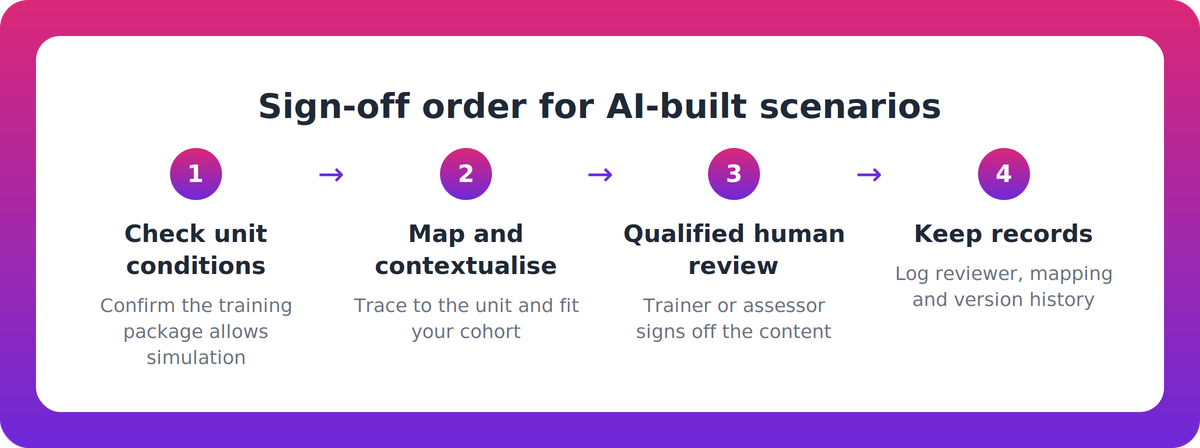
How do you check an AI-generated scenario before it reaches learners? Work through these in order. Each step depends on the one before it.
- Confirm the unit permits simulation. Read the Assessment Requirements and assessment conditions. If workplace assessment is mandatory, stop. Use the scenario for formative practice only, if at all.
- Trace the scenario to the unit. Does it map to the elements, performance criteria, knowledge evidence and Assessment Requirements? Can you point to where each is addressed?
- Check realism against the conditions. Does the setting, equipment and resourcing match what the unit names? A plausible-sounding scenario can still miss the conditions.
- Contextualise to your cohort. Check industry, role, learning environment and learner needs. ASQA reportedly names purchased assessment tools that aren't contextualised to the cohort, learning environment or training product as a known risk (secondary source).
- Have a qualified person review it. Consultancies advise that AI-generated training and assessment content should never be published without validation by a qualified person against unit requirements and industry practice (VET Resources). That means a trainer or assessor with the right vocational competence reading the actual content, not skimming a summary.
- Keep the competency decision with the assessor. The AI can run a practice conversation and give feedback. It doesn't decide competence. SKG Consulting reports that AI can't make an assessment decision or complete validation. That's not confirmed at ASQA, but it's a sound working rule.
- Record the review. See the next section.
What records should you keep?
If an auditor asks how a scenario got to learners, you want to answer from evidence, not memory. Keep:
- the unit code and version the scenario was checked against
- who reviewed it, when, and what they changed
- the mapping to elements, performance criteria and knowledge evidence
- the decision on whether it's formative practice or assessment evidence
- version history for any later edits
The brief doesn't set a prescribed record format, so treat this as good practice rather than a rule.
How should you evaluate an AI role play generator for RTOs?
Most generic AI role-play tools are aimed at sales and contact-centre training (ELM Learning; Mindtickle). That's not a flaw, but VET fit needs checking explicitly. Weigh each option on:
- Assessor control. A human review point before content is used, and competency decisions left with the assessor.
- Training package mapping. Content that traces to the unit, with the unit's conditions respected.
- Contextualisation. Scenarios shaped to your cohort and industry, not generic.
- Separation of formative and assessment. Clear labels, and no blurring in feedback.
- Audit trail. Version history, reviewer records and role-based approvals showing a review took place.
- Privacy and security. How learner data is handled, including the Australian Privacy Principles, plus security documentation. Existing laws such as privacy law still apply to AI use.
- Vendor transparency. How output is quality-checked, and what the vendor doesn't verify.
The National AI Centre's Guidance for AI Adoption (21 October 2025) is a useful lens. Its six voluntary practices are: decide who is accountable, understand impacts, measure and manage risks, share essential information, test and monitor, and maintain human control. It's voluntary and creates no legal duties, but accountability, testing and human control map neatly onto the checklist above.
One caution on ASQA's AI principles. Secondary sources disagree on their status: one calls them draft, released for consultation in March 2026, another presents them as published. They're reported to add no new regulatory requirements. Check ASQA's website for the current version rather than relying on a blog.
Where does Nova fit?
Nova, from Supahuman, is one option worth testing against these criteria. It's described as VETos's companion delivery product, generating role plays, simulations, narrated video and coached practice from an RTO's training products. These are vendor claims, not independently verified.
As described, Nova imports units from training.gov.au and maps activities to elements, performance criteria and knowledge evidence. All its content is positioned as formative practice, its feedback is formative only, it doesn't mark, and assessors keep every competency decision. That lines up with checklist items 2 and 6.
The vendor's FAQ describes an AI quality review of every experience, with humans approving new programme designs, revision requests and anything the reviewer is unsure of. The sites don't say who approves what inside an RTO, so ask. Role-based approvals, version history and an audit trail are listed as VETos platform features, not Nova's. Pricing is per active learner, ramping down with volume, with a 14-day free trial. No customer outcomes, case studies or statistics are published, and independent evaluations weren't found. Ask for them.
A low-pressure next step
Before you talk to any vendor, pick one unit and run it through the seven steps by hand. You'll learn what your trainers actually need to see, and you'll have a fair benchmark for every demo. If you'd like to look at Nova alongside others, the Supahuman site is the place to start, and the free trial lets your assessors test it on a real unit.
Key takeaways
- Check the unit's assessment conditions first. Simulation is only available where the training package allows it.
- Sources report no ASQA approval or certification for AI tools, so due diligence sits with your RTO.
- A qualified trainer or assessor must review AI-built content against the unit before learners see it, and the competency decision stays with the assessor.
- Keep reviewer, mapping and version records so you can show the review happened.
- Ask every vendor about formative versus assessment separation, privacy, audit trail and what they don't verify.
Our take
Buyers spend too long comparing features and too little time deciding who signs off. We think the best AI role play generator for RTOs is the one that makes your assessor's review quick, visible and hard to skip. If a tool can't show you how it maps to the unit, or blurs practice and assessment, no demo polish makes up for it. Treat AI as a fast first draft that your qualified people own.
FAQ
Can an RTO use AI-generated role-plays under the Standards for RTOs 2025?
Yes, with conditions. The unit's assessment conditions must allow simulation, the scenario must match the Assessment Requirements and cohort, and a qualified trainer or assessor must review it. Competency decisions stay with the assessor.
Does ASQA approve or certify AI tools?
Secondary sources report no ASQA-approved vendor list, certification or approval gate for AI use. That isn't confirmed at ASQA, so assume the RTO carries responsibility for its own due diligence and check ASQA's website.
What should a trainer or assessor sign off before AI role-play content is used?
They should confirm the unit permits simulation, the scenario traces to elements, performance criteria and knowledge evidence, and it suits the cohort and learning environment. They should also record whether it's formative practice or assessment evidence, and keep a dated review record.
What's the difference between AI role-play for practice and simulated assessment?
Practice builds skill before assessment. Simulated assessment produces evidence the assessor uses to judge competence, so it must meet the unit's conditions. Either way, the assessor makes the competency decision, not the AI.