Unit Standard Coverage Mapping Software: What AI Can Prove
5 October 2026 · 8 min read
No. AI can't prove unit standard coverage before NZQA moderation. Moderation tests your assessment materials and your assessors' judgements, and no NZQA source treats a software-generated map as proof. Good unit standard coverage mapping software gives you a traceable, versioned, human-reviewed map that supports your own moderation preparation.
What does NZQA moderation actually test?
It tests two things: your assessment materials, and the judgements your assessors make with them. NZQA's national external moderation guidelines expect providers with consent to assess to supply an accurate annual assessment plan, meet moderation deadlines, and show that assessor judgements are fair, valid and consistent nationally.
A mapping tool's output isn't on that list. Our research found no NZQA statement that a software-generated coverage map counts as proof of compliance. It also found no NZQA endorsement, accreditation or approval of coverage-mapping or AI assessment software.
So treat a map as supporting evidence. It shows your thinking. It doesn't replace it.
Two other pieces of context matter:
- You need NZQA consent to assess before offering programmes assessed against standards on the Directory of Assessment Standards (DASS). Every DASS standard has consent and moderation requirements (CMRs) attached.
- The Consent to Assess Against Standards on the DASS Rules 2026 came into force on 19 January 2026. Applicants must show how they'll meet the Quality Assurance of Tertiary Education Providers Rules, and comply with them to keep consent.
Workforce development councils manage national external moderation of industry unit standards. NZQA organises it for the unit and achievement standards it is responsible for. Check which applies to your standards.
What does unit standard coverage mapping software actually do?
At its best, it links every assessment task back to the specific outcomes, evidence requirements and performance criteria of a standard. It shows where coverage is thin or missing. It keeps that link current when you adapt a task.
That saves real time compared with a spreadsheet built by hand. But it's a drafting and organising aid. A qualified assessor still checks whether the task, the evidence and the guide really meet the standard.
What should you look for as skill standards replace unit standards?
This is where tools differ most. Skill standards are progressively replacing unit standards. They generally replace several unit standards, carry larger credit values and are less prescriptive. Standard setting bodies are expected to set two-year transition periods for superseded unit standards (NZQA, Guidelines for listing skill standards on the DASS, April 2025).
That means mapping can't only be one-to-one. Use these criteria:
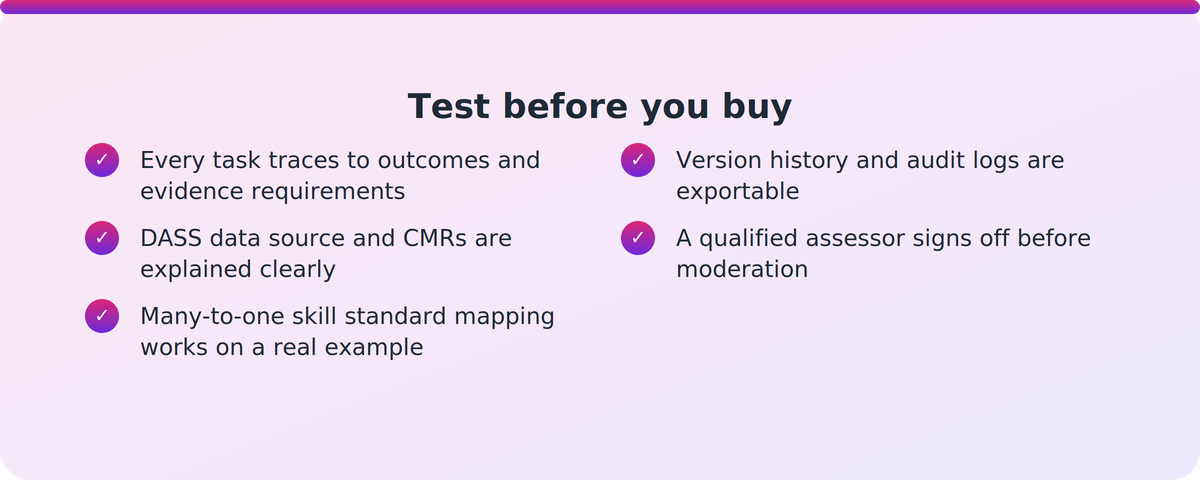
- Traceability. Does every task map to specific outcomes and evidence requirements? Can you export the map and update it when a task changes?
- Currency against the DASS. Is standards data pulled live from NZQA, or uploaded manually? Does it cover CMRs, version IDs and expiry dates? Ask directly.
- Skill standard readiness. Test a real unit-to-skill conversion, including many-to-one mapping. Check that a version trail shows what changed.
- Audit trail. Version history and audit logs should let you answer a moderation request without reconstructing evidence after the fact.
- Human sign-off. There should be a clear, auditable review step by a qualified assessor or moderator before anything goes to moderation.
- Fit with NZ delivery. Some vendor content refers to Australian regulators and data sources. Confirm which pages and features apply to NZQA.
- Data hosting, security and LMS compatibility. Know where learner and assessment data sits and whether the tool works alongside your LMS.
- Evidence over marketing. Check what's released versus coming soon, and speak to customers who've been through external moderation.
Version tracking matters more than it sounds. A revised unit standard gets a new ID number with a reference to the standard it replaced. The standard setting body is responsible for ensuring training relates to current versions (NZQA, Changes to standards and national qualifications). A map built on a superseded version is a liability, however tidy it looks.
How do you check a tool uses current DASS standards and CMRs?
Don't take 'up to date' on trust. Put these questions to every vendor:
- Where does your standards data come from, and how often is it refreshed?
- Is it a live NZQA feed, or do we upload standards ourselves?
- Do you hold CMRs, and how are changes to them flagged?
- Can you show a standard that was replaced, with the old and new IDs linked?
- Can we see the version trail for one of our own assessments?
Then run a pilot on a standard you know well. If you can spot a gap the tool misses, you've learned something useful before you've paid for anything.
Does using AI change who is accountable?
No. Accountability stays with your organisation. NZQA's requirements on internal moderation, and on engaging with the national external moderation system, apply to you regardless of how the materials were drafted.
NZQA's tertiary guidance on generative AI is about conduct and academic integrity. It encourages providers to help staff understand how generative AI can be used in teaching, learning and assessment, and to review integrity policies regularly. It isn't a ruling on coverage-mapping tools, and it doesn't shift responsibility to a vendor.
In practice, build the human step into your process: a qualified assessor reviews the AI-assisted materials and the map, signs off, and your internal moderation runs as normal.
Where does VETos fit?
Supahuman describes VETos as one example of software in this category, not the only option. Here is what it states, and where the gaps are.
- Everything it generates is mapped back to the relevant unit standard with a traceable map. In NZ, it works from the provider's consent and moderation requirements.
- It holds both unit and skill standards, and upgrades existing unit-standard materials to skill-standard replacements as they convert, with a version trail.
- It lists version history, currency control, audit trails, a standards library filterable by level, expiry and compliance status, and a QA Engine that checks assessments against NZQA's Principles of Assessment.
- It generates assessment tools with assessor guidance and mapping, including for NZ moderation preparation and evidence packs.
The caveats are worth knowing. Update detection works from standards you upload, not a live NZQA feed. The assessor-consistency feature (AQA) is labelled coming soon. We found no NZQA moderation pass rates or independent verification of coverage claims. The '95% first-time validation pass rate' is an Australian figure, not an NZQA result, and the detailed mapping page describes Australian data sources. Reported time savings from customers are vendor-reported.
Vetos states that a qualified person still reviews and signs off. That's the right model, and it's the one to hold every vendor to.
A sensible next step
Before any demo, write down one real unit-to-skill conversion from your own portfolio and one question about CMRs. Ask each vendor to work through both live. If you'd like to see how VETos handles that test, you can look at Supahuman. The checklist above is worth using whether or not you ever talk to us.
Key takeaways
- AI can't prove coverage. NZQA moderation tests assessment materials and assessor judgements, and no NZQA source treats a software map as proof.
- The value of mapping software is a traceable, versioned map that a qualified assessor reviews and signs off.
- Skill standards often replace several unit standards, so test many-to-one mapping and the version trail.
- Ask how standards data and CMRs are sourced: live feed or manual upload.
- Accountability for internal and external moderation stays with your organisation.
Our take
Be suspicious of the word 'proof' in any vendor pitch. Moderators judge your materials and your assessors, so the useful question is whether a tool makes your own evidence easier to build, check and defend. We'd weight version history and honest answers about data currency above any headline time saving. Vendors, including us, should expect to be asked for customers who've been through external moderation.
FAQ
Can AI software prove my assessments cover a unit standard before NZQA moderation?
No. AI can produce a traceable map of tasks against a standard, but NZQA moderation tests your assessment materials and assessor judgements. The research found no NZQA statement treating a software-generated map as proof. Use it as supporting evidence, reviewed by a qualified assessor.
What should I look for in unit standard coverage mapping software as skill standards arrive?
Look for many-to-one mapping, a version trail showing what changed in a unit-to-skill conversion, exportable maps, audit logs, and a human sign-off step. Skill standards generally replace several unit standards, so one-to-one mapping alone won't be enough.
Does using AI to build assessments change who is accountable under NZQA moderation?
No. Your organisation remains accountable for internal moderation and for engaging with national external moderation. NZQA's AI guidance focuses on integrity and conduct. A qualified person should review and sign off AI-assisted materials.
How do I check a tool uses current DASS standards and CMRs?
Ask where the data comes from, whether it's a live NZQA feed or a manual upload, and whether it covers CMRs, version IDs and expiry dates. Then pilot it on a standard you know well and check that replaced standards link to their successors.